

𝗦𝗮𝗻𝗶𝗮
Generate Your Own Motion Blur Commuter Crowd Portrait
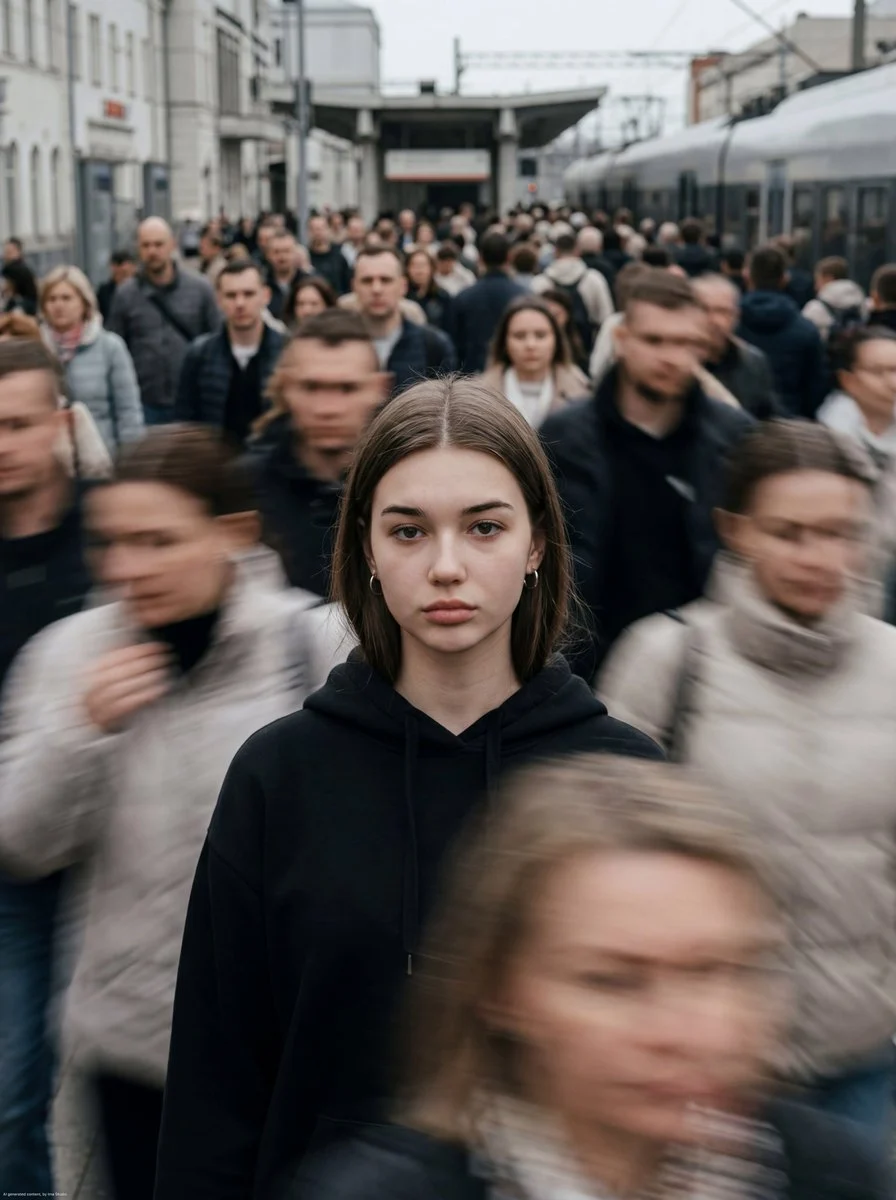
Cinematic motion-blur photography shot on a Leica SL3 with a 50mm Summilux at f/2.8, captured from a chest-level frontal angle using slow shutter panning. Lighting setup: flat overcast daylight acti...












Generate Your Own Motion Blur Commuter Crowd Portrait
Dive into the captivating world of urban photography with our 'motion blur commuter crowd portrait' prompt. This specialized prompt allows you to generate stunning images that juxtapose a sharp, still subject against the dynamic, streaking backdrop of a busy city.
Crafted for the "Portrait Photography" category using the sophisticated Nanobanana Pro model, this prompt excels at creating a sense of quiet rebellion amidst chaos. The unique aesthetic captures the essence of a cinematic moment, making the motion blur commuter crowd portrait a powerful visual narrative. It's perfect for artists and designers looking to evoke emotion and movement in their digital creations.
When to Use This Prompt
Editorial Photography
Ideal for magazine spreads or online articles that require a compelling visual narrative contrasting stillness and motion.
Album Art & Book Covers
Create evocative cover art that reflects themes of urban life, solitude, or the passage of time with a motion blur commuter crowd portrait.
Concept Art & Mood Boards
Generate powerful imagery for film, game, or advertising projects exploring themes of anonymity, urban environments, or personal reflection.
Personal Art Projects
Experiment with advanced photographic techniques and create unique pieces for your portfolio, focusing on the dynamic motion blur commuter crowd portrait style.
How to Use This Prompt
Understand the Core Concept
The prompt focuses on a sharp, still subject against a background of blurred, moving commuters. This creates a striking visual hierarchy.
Adjust Subject Details
Modify the subject's gender, age, attire, or expression to fit your desired narrative. Remember, their stillness is key to the motion blur commuter crowd portrait.
Experiment with Lighting & Color
While the default is muted, overcast tones, try subtly shifting to warm or cool palettes to alter the mood of your motion blur commuter crowd portrait.
Refine Motion Intensity
While not directly in the prompt, subtle tweaks to 'slow shutter panning' or 'blur trails' might be possible in advanced models to control blur strength.
Customization Tips
Change Subject's Attire
Instead of 'understated fashion,' try 'vibrant raincoat' or 'business suit' to alter the subject's presence within the motion blur commuter crowd portrait.
Vary Facial Expression
Modify 'sharp eyes' to 'gazing thoughtfully' or 'slight smirk' to convey different emotions without losing the stillness.
Adjust Camera Angle
Experiment with 'eye-level' or 'low-angle' instead of 'chest-level frontal' to change the perspective and impact of the motion blur commuter crowd portrait.
Introduce Subtle Props
Add 'holding an old book' or 'wearing headphones' to give the still subject a subtle narrative element within the bustling scene.