

AmirMušić
Crafting Your Giant 3D Brand Logo Sculpture
Act as a High-End Product Photographer and CGI Artist. PHASE 1: SUBJECT & LOGIC Generate a massive, perfectly centered, three-dimensional physical sculpture of the official, unaltered corporate logo ...
.%20The%20sculpture%20is%20suspended%20in%20mid-air.%20Autonomously%20identify%20the%20exact%20official%20shape%20and%20structure%20of%20the%20[BRAND%20NAME]%20logo%20and%20render%20it%20as%20a%20single%2C%20flawless%20glass%20object%20without%20any%20modifications.PHASE%202%3A%20MATERIALITY%20(GLASS)The%20entire%20logo%20is%20made%20of%20hyper-realistic%2C%20optical-grade%20crystal%20glass%20(not%20water%2C%20not%20gel).%20The%20material%20is%20solid%2C%20colorless%2C%20and%20boasts%20high%20clarity%20with%20a%20high%20refractive%20index.%20It%20must%20look%20heavy%20and%20%D0%BC%D0%BE%D0%BD%D0%BE%D0%BB%D0%B8%D1%82%D0%BD%D0%BE%D0%B5%20(monolithic).%20The%20glass%20structure%20contains%20subtle%2C%20photorealistic%20microscopic%20flaws%3A%20fine%20polished%20scratches%20on%20the%20surface%20and%20minor%20internal%20inclusions%20(dust%20particles%2Fseed%20bubbles%2C%20very%20few)%20to%20avoid%20%E2%80%9CCGI%20plastic.%E2%80%9D%20The%20edges%20must%20be%20precision-beveled%20and%20fire-polished.PHASE%203%3A%20ENVIRONMENT%20%26%20CAUSTICSThe%20logo%20is%20suspended%20against%20a%20strictly%20clean%2C%20bright%20blue%20sky%20with%20sparse%2C%20naturally%20defined%20white%20cumulus%20clouds.%20NO%20land%2C%20NO%20trees%2C%20NO%20palms.%20The%20background%20is%20purely%20atmospheric.%20The%20focus%20is%20entirely%20on%20the%20glass%20logo.%20Critically%20render%20hyper-realistic%2C%20complex%20glass%20caustics%3A%20intense%2C%20sharp%20patterns%20of%20focused%20light%20and%20color%20(refractions%20of%20the%20blue%20sky)%20cast%20inside%20and%20onto%20the%20surface%20of%20the%20glass%20form%20due%20to%20the%20sunlight%20passing%20through%20it.TECH%20SPECSRendered%20with%20Arnold%20or%20Octane.%20Phase%20One%20XF%2C%20120mm%20Macro%20lens.%20Aperture%20f%2F5.6%20for%20sharp%20depth%20across%20the%20entire%20glass%20sculpture.%20Intense%2C%20direct%20sunlight%20(hard%20lighting)%20to%20maximize%20caustics.%20Global%20illumination%2C%20ray-traced%20refractions%20(double-sided%20geometry)%2C%20and%20chromatic%20aberration%20emulation%20(subtle)%20for%20optical%20realism.%20Fine%20grain%20film%20emulation%20(Fujifilm%20Velvia%2050).&image=https%3A%2F%2Fcdn.enhanceimage.org%2FEnhanceImage%2Fimgs%2Fprompts%2Ftweets%2F2043027627640799569%2F0.jpg)
Crafting Your Giant 3D Brand Logo Sculpture
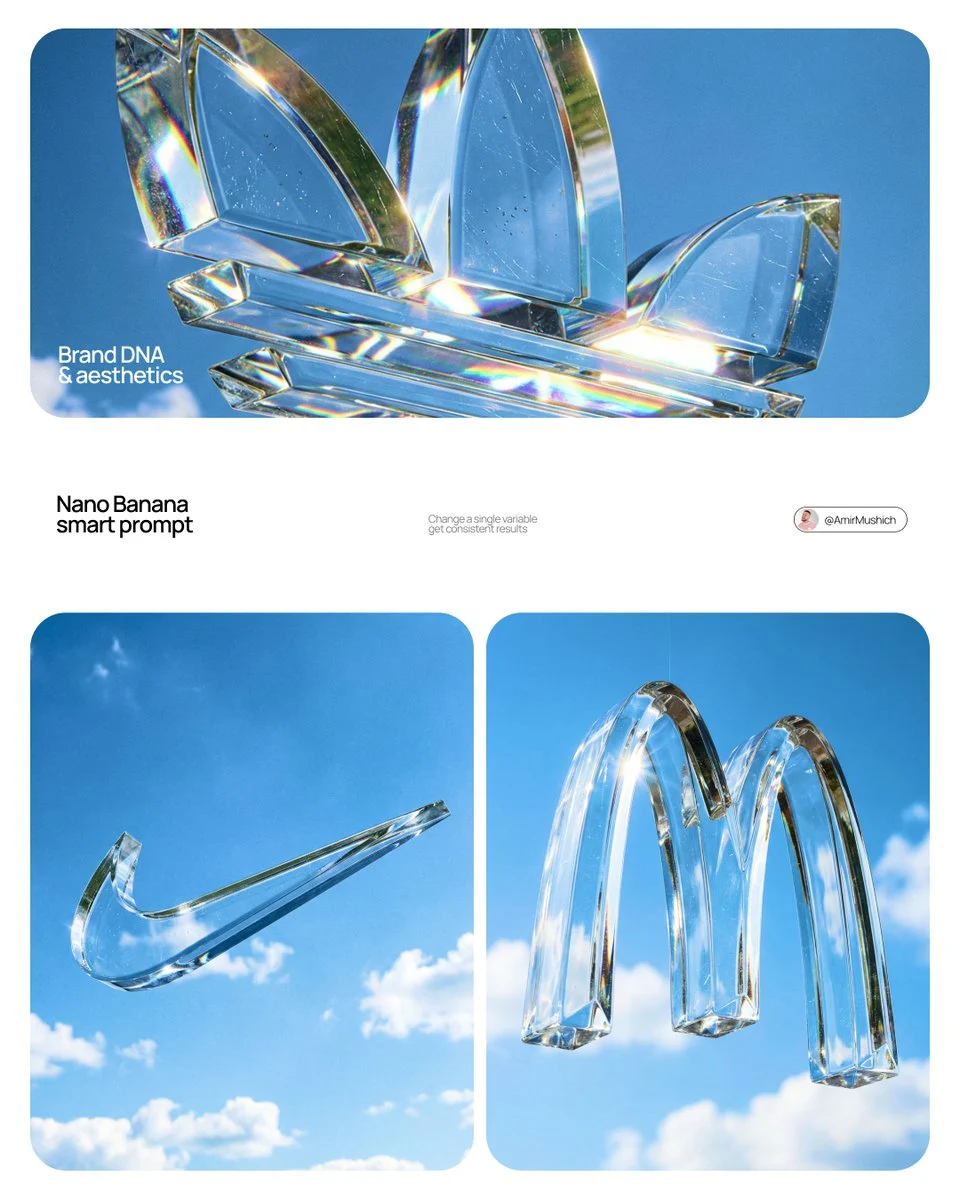
Unleash the power of monumental branding with this incredible AI prompt from EnhanceImage. Designed to act as a high-end product photographer and CGI artist, it meticulously renders a giant 3D brand logo sculpture, making your brand's identity truly stand out. This prompt specializes in creating a flawless, suspended glass object that captures light and attention in a spectacular fashion.
What makes this prompt truly special is its attention to detail, particularly in the materiality of the glass and the environmental interaction. It goes beyond a simple render, simulating optical-grade crystal glass with microscopic flaws, precise bevels, and fire-polished edges. The result is a visually stunning giant 3D brand logo sculpture that looks incredibly real, avoiding the common 'CGI plastic' look.
Whether you're looking to visualize a new brand campaign, create an impactful hero image, or explore conceptual art for corporate identity, this prompt for a giant 3d brand logo sculpture provides an unparalleled starting point. It's an essential tool for designers and marketers aiming for premium visual communication.
When to Use This Prompt
High-Impact Brand Visuals
Generate hero images for websites, presentations, or advertisements that demand attention with a sophisticated giant 3D brand logo sculpture.
Conceptual Art & Mockups
Visualize your brand's logo in a grand, artistic manner for pitches, mood boards, or pre-visualization of physical installations.
Marketing Campaigns
Create unique and memorable visuals for product launches, rebrands, or special announcements using a distinct giant 3D brand logo sculpture.
Architectural Visualization
Imagine how a monumental brand logo might appear in an open-air setting or as part of a large-scale artistic installation.
How to Use This Prompt
Define Your Brand Name
Replace `[BRAND NAME]` in the prompt with the exact name of the brand whose logo you wish to render. The AI will autonomously identify its official shape.
Select a Model
Utilize the Nanobanana Pro model for optimal results, as it's specifically tuned for this level of detail and realism.
Generate and Review
Run the prompt and observe the generated image. Pay attention to the glass quality, caustics, and overall impact of your giant 3D brand logo sculpture.
Iterate if Needed
If the initial result isn't perfect, consider subtle adjustments to the environment or material description (see customization tips).
Customization Tips
Adjust Material Finesse
Experiment with phrases like 'more pronounced internal inclusions' or 'fewer surface scratches' to fine-tune the glass realism of your giant 3D brand logo sculpture.
Vary Sky Conditions
While the prompt specifies blue sky, you could subtly introduce 'a hint of sunrise glow' or 'dramatic storm clouds (distant)' for different moods, carefully maintaining focus on the giant 3D brand logo sculpture.
Lens & Lighting Tweaks
Slightly modify 'Aperture f/5.6' to 'f/4' for shallower depth of field or 'soft, diffused sunlight' for a less dramatic caustic effect on the giant 3D brand logo sculpture.
Chromatic Aberration Intensity
Change 'subtle' chromatic aberration to 'pronounced' or remove it entirely if you prefer a different optical feel for your giant 3D brand logo sculpture.