

Amira Zairi
Mastering the Exploded View Product Ad
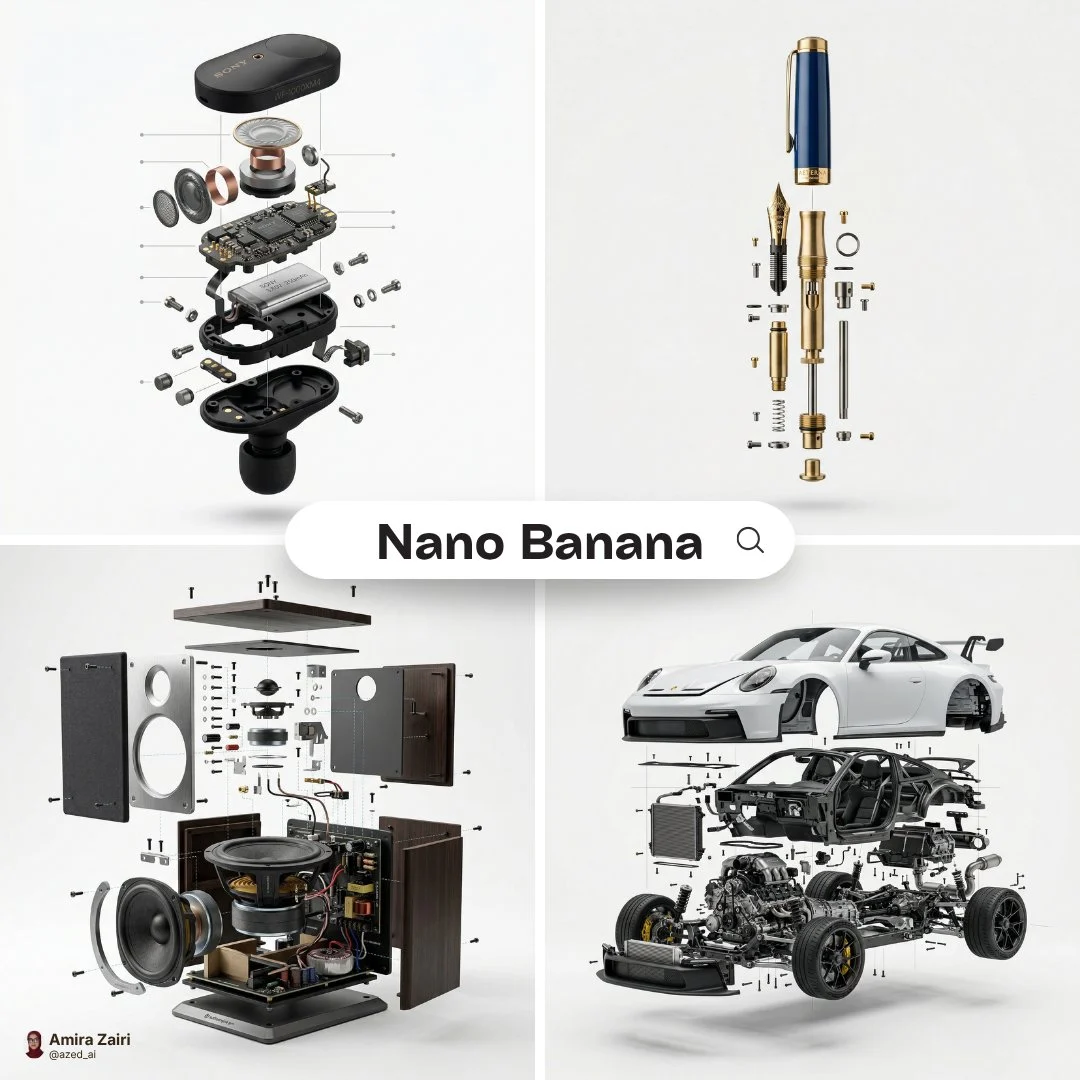
[product], high-end product advertising, white seamless background, exploded view with inner mechanics revealed, outer shell hovering above core, micro screws and components suspended, perfect alignme...














Mastering the Exploded View Product Ad
Dive into the world of sophisticated product visualization with our premium prompt designed to generate breathtaking exploded view product ads. This prompt is engineered to meticulously reveal the inner workings of any product, presenting its components in a perfectly aligned, visually stunning arrangement. It's an essential tool for designers, marketers, and engineers looking to highlight innovation and craftsmanship.
What makes this prompt truly special is its ability to create hyper-realistic imagery, mimicking professional macro product photography. You'll achieve crisp details, perfect lighting, and a seamless background, making your product the undeniable star. This specific approach to an exploded view product ad elevates standard product shots into art, providing a deeper understanding and appreciation for what's inside.
Generated using the advanced Nanobanana Pro model, this prompt ensures top-tier quality, delivering images that are not just beautiful but also technically precise. Whether you're showcasing complex electronics or intricate mechanical designs, this prompt provides the perfect foundation for an impactful exploded view product ad.
When to Use This Prompt
High-End Product Launches
Generate stunning visuals to accompany new product releases, emphasizing innovative design and internal engineering with a captivating exploded view product ad.
Technical Documentation & Manuals
Provide clear, detailed diagrams for assembly guides, repair manuals, or educational content, making complex components easy to understand.
Marketing & Advertising Campaigns
Create eye-catching advertisements that go beyond the surface, drawing viewers in with the intricate beauty of an exploded view product ad.
Design Portfolio & Showcases
Impress clients and peers by showcasing your product designs with professional, detailed internal views that highlight your attention to detail.
How to Use This Prompt
Identify Your Product
Begin by clearly defining the 'product' you want to visualize. Be specific (e.g., 'luxury watch movement', 'smartphone circuit board').
Specify Material & Finish
Add details about materials (e.g., 'brushed aluminum', 'polished chrome', 'transparent plastic') to enhance realism.
Adjust Component Complexity
If your product has many parts, you might specify 'intricate gears' or 'micro-electronics' to guide the AI.
Experiment with Lighting
While 'crisp soft shadow' is default, try 'studio lighting' or 'ambient light' for different moods for your exploded view product ad.
Customization Tips
Vary the Background
Instead of 'white seamless background', try 'dark studio background' or 'minimalist grey backdrop' to change the mood of your exploded view product ad.
Refine Component Details
Add specific adjectives for components, like 'glowing LED indicators' or 'precision-machined screws' to enhance realism.
Adjust Camera Lens & Aperture
Experiment with '50mm lens look, f/2.8' for a shallower depth of field or '200mm lens look, f/11' for more compression in your exploded view product ad.
Introduce Subtle Interactions
Consider adding phrases like 'light refracting through glass' or 'subtle reflections on metal' for an extra layer of realism.