

simeon-sanai
Mastering the Vehicle Exploded Engineering Diagram with AI
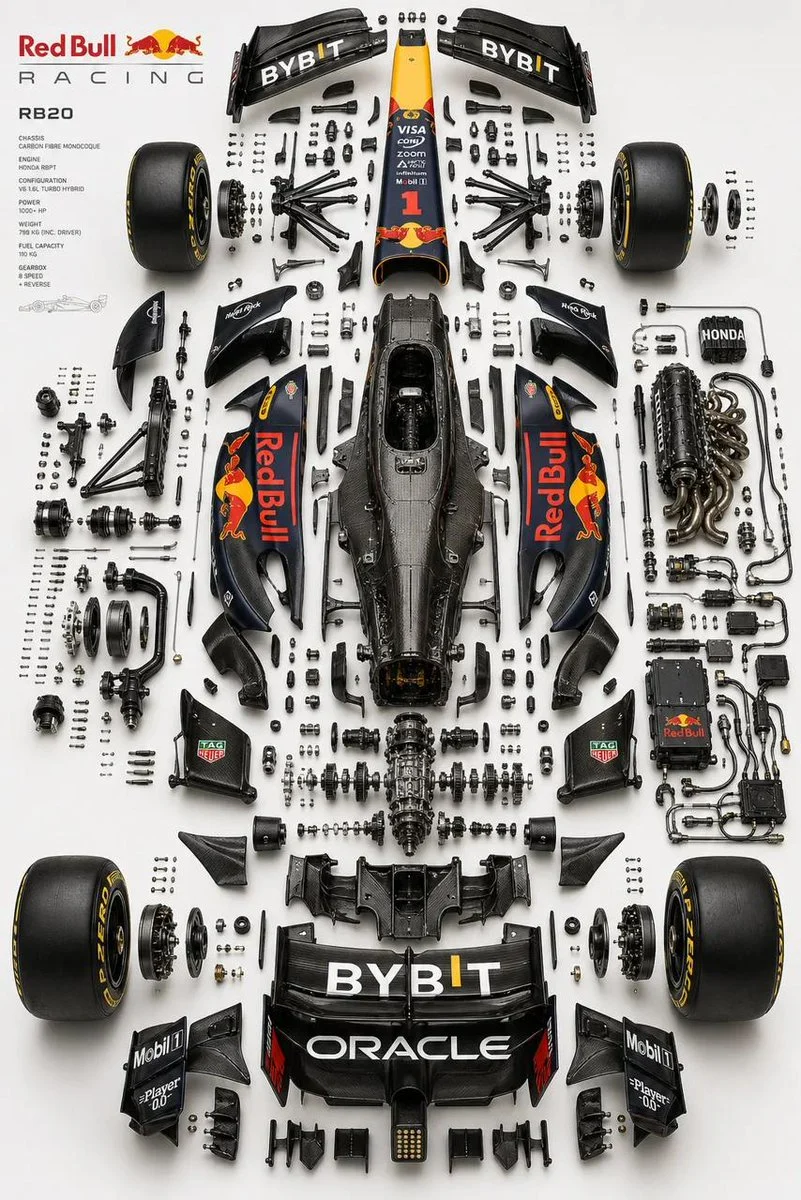
Place the primary chassis or structural platform perfectly centered as the core spine, and position the main body shell separately (left or top), aligned parallel as a reference form while preserving ...
















%2C%20aligned%20parallel%20as%20a%20reference%20form%20while%20preserving%20accurate%20proportions%2C%20stance%2C%20and%20geometry%20of%20the%20real%20vehicle.%EF%BF%BC%20Design%20a%20multi-layered%20exploded%20system%20with%20components%20separated%20across%20depth%20(Z-axis)%20as%20well%20as%20planar%20spacing%2C%20using%20clear%20hierarchy%3A%20micro%20hardware%20(bolts%2C%20screws%2C%20washers)%20tightly%20grouped%2C%20functional%20assemblies%20moderately%20spaced%2C%20and%20major%20systems%20widely%20separated.%EF%BF%BC%20Organize%20parts%20into%20realistic%20subsystems%20depending%20on%20the%20vehicle%20type%2C%20including%20front%20assembly%20(suspension%2C%20steering%2C%20brakes)%2C%20rear%20assembly%20(suspension%2C%20drivetrain%2C%20differential)%2C%20chassis%2Fstructure%20(frame%2C%20monocoque%2C%20subframes)%2C%20powertrain%20(engine%20or%20motor%20with%20slight%20internal%20exposure%2C%20transmission%2C%20intake%2C%20exhaust%2C%20cooling)%2C%20electronics%20(battery%2C%20ECU%2C%20wiring%20harness%20with%20clean%20routing)%2C%20and%20wheel%20systems%20(4%20wheels%20symmetrically%20placed%20with%20tire%2C%20rim%2C%20and%20hub%20separation).%EF%BF%BC%20Ensure%20engineering%20realism%20by%20preserving%20mechanical%20relationships%2C%20aligning%20shafts%20and%20rotational%20axes%2C%20maintaining%20symmetry%20across%20left%2Fright%20systems%2C%20and%20grouping%20micro%20components%20logically%20near%20their%20assembly%20points%20in%20precise%20micro-grid%20arrangements.%20Avoid%20random%20placement.%20Use%20a%20refined%2C%20high-end%20aesthetic%3A%20soft%20neutral%20gradient%20background%20(white%20to%20light%20grey%20or%20warm%20beige)%2C%20studio-grade%20product%20lighting%20with%20soft%20top%20illumination%2C%20subtle%20directional%20shadows%2C%20and%20controlled%20reflections.%20Apply%20realistic%20materials%20such%20as%20brushed%20metal%2C%20carbon%20fiber%2C%20rubber%2C%20and%20glass%20with%20slight%20wear%E2%80%94avoid%20toy-like%20finishes.%20Maintain%20strong%20horizontal%20symmetry%20with%20controlled%20depth%20asymmetry%20for%20visual%20complexity%2C%20and%20ensure%20balanced%20negative%20space%20to%20avoid%20overcrowding.%20Render%20in%20ultra-realistic%20quality%20with%20razor-sharp%20edges%2C%20macro-level%20detail%2C%20subtle%20ambient%20occlusion%2C%20and%20ray-traced%20shadows.%20Output%20in%202K%20or%204K%20resolution%2C%204%3A5%20aspect%20ratio.%EF%BF%BC%20%EF%BF%BC%20No%20text%2C%20no%20labels%2C%20no%20arrows%2C%20no%20branding%20overlays%2C%20no%20stylization%2C%20no%20perspective%20distortion.%20Style%20keywords%3A%20F1%20engineering%20exploded%20diagram%2C%20luxury%20automotive%20technical%20poster%2C%20industrial%20design%20breakdown%2C%20Apple-style%20product%20visualization%2C%20ultra-precision%20mechanical%20layout%2C%20museum-grade%20presentation.%EF%BF%BC&image=https%3A%2F%2Fcdn.enhanceimage.org%2FEnhanceImage%2Fimgs%2Fprompts%2Ftweets%2F2050944419273285698%2F0.jpg)
Mastering the Vehicle Exploded Engineering Diagram with AI
Unleash the power of AI to create breathtaking vehicle exploded engineering diagrams. This advanced prompt, designed for the "Illustration & 3D" category and generated with GPT Image (ChatGPT), allows you to visualize complex machinery with unparalleled precision and aesthetic appeal. It's engineered to produce images that are not just technically accurate but also visually stunning, perfect for a wide range of professional applications.
Imagine a world where intricate automotive or mechanical designs can be deconstructed and presented with museum-grade clarity. This prompt makes that a reality, focusing on engineering realism, precise component separation, and a refined, high-end studio aesthetic. Whether you're an engineer, designer, educator, or marketer, mastering the vehicle exploded engineering diagram has never been more accessible or visually rewarding.
When to Use This Prompt
Automotive Design & Engineering
Visualize new vehicle concepts, analyze component interactions, or present intricate engineering solutions with a detailed vehicle exploded engineering diagram.
Educational Content
Develop compelling teaching materials for mechanical engineering, automotive technology, or industrial design courses, clearly illustrating internal structures.
Product Marketing & Sales
Showcase the innovative internal workings and build quality of products in brochures, presentations, or digital campaigns, using a sophisticated vehicle exploded engineering diagram.
Technical Documentation
Enhance user manuals, service guides, or patent applications with clear, precise visual breakdowns of complex assemblies.
How to Use This Prompt
Define Your Vehicle Type
Start by specifying the type of vehicle (e.g., 'sports car', 'electric motorcycle', 'heavy-duty truck') to guide the AI's component selection.
Adjust Component Exposure
Experiment with phrases like 'slight engine internal exposure' or 'fully visible transmission gears' to control the level of detail within assemblies.
Refine Aesthetic Details
Modify background gradients, lighting styles, or material finishes (e.g., 'matte black carbon fiber', 'polished chrome') to match your brand or project needs.
Iterate for Perfection
Generate multiple images, making small adjustments to the prompt each time to achieve the ideal vehicle exploded engineering diagram.
Customization Tips
Specify Vehicle Brand/Model
While avoiding specific branding, you can hint at a style by mentioning 'inspired by [luxury car brand]' for a particular aesthetic without direct replication in your vehicle exploded engineering diagram.
Vary Exploded Depth
Adjust terms like 'tightly grouped micro hardware' or 'widely separated major systems' to control the perceived depth and spacing of components in your vehicle exploded engineering diagram.
Change Materials & Finish
Experiment with 'chrome finish', 'anodized aluminum', or 'weathered steel' to give your components a distinct look, moving beyond the default realistic materials.
Alter Lighting & Shadows
Try 'dramatic backlighting', 'diffused ambient light', or 'hard shadows' to create different moods or emphasize specific parts of the vehicle exploded engineering diagram.